0.1: Installation
- Time to Complete: 5 minutes
- Prerequisites: Claude Pro or Max subscription
Overview
This course runs in the Claude Desktop app. Install the app, sign in, paste one prompt, and Claude sets up the whole course for you.
Prefer the terminal? → Claude Code CLI guide
Key takeaway: You need a paid Claude subscription and the Claude Desktop app. Setup takes about 5 minutes.
Prerequisites
| Requirement | Details |
|---|---|
| Claude Subscription | Claude Pro ($20/month) or Claude Max. Free tier NOT supported. Sign up at claude.ai |
| Operating System | macOS or Windows 10+ (Linux users: use the Claude Code CLI guide) |
Install the Claude Desktop App
Mac:
- Download the Mac app from claude.ai/download
- Open the downloaded file and drag Claude into your Applications folder
- Launch Claude and sign in with your Pro or Max account
Windows:
- Download the Windows installer from claude.ai/download
- Run the installer and follow the steps
- Launch Claude and sign in with your Pro or Max account
That’s it. No terminal, no Node.js, no extra tools.
Verify It Works
Open Claude and start a new chat. If Claude responds, you’re set.
Start the Course
-
In Claude, start a new project
-
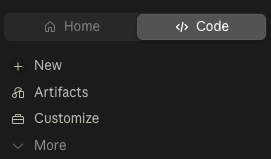
Go to the Code tab (upper left):
-
Paste this prompt:
Fetch fullstackpm.com/cli and help me start Claude Code for Product ManagersWhat Happens Next
Claude takes it from there: it installs the FSPM CLI, downloads the course into your project, and greets you with a short welcome tour. When it’s done, it tells you exactly how to begin your first lesson.
Important: Use a new project, not a plain chat. The course files live in the project, so every lesson starts from there.
What’s Next?
Module 0.2: Get the course materials and start your first lesson. One prompt does the whole setup.
Resources
- Official Documentation
- Claude Code CLI guide (the terminal path)
About This Course
Created by Carl Vellotti. If you have any feedback about this module or the course overall, message me! I’m building a newsletter and community for PM builders, check out The Full Stack PM.
Source Repository: github.com/carlvellotti/free-ai-courses