
3.0: Setup & Start
- Time to Complete: 5 minutes
- Prerequisites: Claude installed (0.1), Google account
What is Nano Banana?
Nano Banana teaches you to generate professional images using Gemini 3 Pro Preview (codenamed “Nano Banana Pro”) - Google’s most advanced image generation model. But this isn’t just a course about prompting an image generator.
This is a Claude Code course.
You’ll learn to build a complete image generation workflow where Claude Code:
- Runs your generations - Execute image requests straight from your conversation with Claude
- Batches multiple images - Generate variants and iterations in parallel
- Manages your files - Organize outputs, name them intelligently, track versions
- Builds your style library - Create and maintain reusable style definitions
- Iterates with you - Refine prompts, adjust parameters, and improve results conversationally
By the end of this course, you’ll be able to create:
- Persona portraits and lifestyle shots
- Journey maps and user flow visualizations
- Wireframes and device mockups
- Architecture diagrams and strategy frameworks
- Marketing assets and launch graphics
Key insight: You’re not just learning to generate images - you’re building a professional creative pipeline powered by Claude Code that compounds over time. The workflow matters as much as the output.
Before You Start
You’ll need:
- Claude installed and working (0.1: Installation)
- A Google account
- A payment method for Google Cloud billing
About cost: Gemini 3 Pro charges ~$0.10 per image. The entire course costs less than $5 total. Claude will walk you through setting up billing in the first module.
Get the Course and Start
Nano Banana ships with the Claude Code for PMs course materials.
Already did Module 0.2? You have the files. Open your course project and type /start-3-1-1.
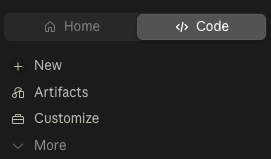
Starting fresh? This course runs in the Claude Desktop app. Open it, start a new project, and paste this prompt:
Fetch fullstackpm.com/cli and help me start Claude Code for Product ManagersClaude installs the FSPM CLI, downloads the course materials (including Nano Banana), and tells you how to begin. Then type /start-3-1-1.
Alternative: The Claude Code CLI
The same prompt works in the terminal. (Haven’t installed the CLI? See the Claude Code CLI guide.) Start Claude Code in a folder for the course:
mkdir -p ~/Documents/claude-code-pm-course
cd ~/Documents/claude-code-pm-course
claude
Then paste:
In the Claude Desktop app, click the Code tab (upper left), start a new project, and paste:
Fetch fullstackpm.com/cli and help me start Claude Code for Product ManagersOnce installed, type /start-3-1-1 to begin.
What You’ll Learn
Module 3.1: Introduction to Image Generation
- 3.1.1: Welcome & First Generation - Set up your API key and generate your first image
- 3.1.2: Understanding the Basics - Parameters, aspect ratios, resolution, iteration
- 3.1.3: Consistency & Style - Golden Rules of prompting, reference images, variants
- 3.1.4: Building Your Style Database - Create a reusable library of styles
Module 3.2: PM Use Cases
- 3.2.1: Users & Product Visuals - Personas, journey maps, wireframes, mockups
- 3.2.2: Strategy & Architecture - Diagrams, matrices, roadmaps
- 3.2.3: Marketing & Launch Assets - App store graphics, ads, announcements
Troubleshooting
The install fails
Ask Claude to try again. If it still fails, check fullstackpm.com/cli for install help.
Claude doesn’t recognize /start commands
Make sure you’re in the project (or folder) where the course was installed. The slash commands only work when Claude has access to the module files. If the course installed but /start-3-1-1 is missing, ask Claude to update the course with the FSPM CLI.
What’s Next?
Once the course is installed in your project:
Type: /start-3-1-1
Claude will guide you through:
- Getting your Gemini API key
- Setting up billing
- Generating your first image
The entire setup takes about 5 minutes, and you’ll have your first AI-generated image before you know it.
About This Course
Created by Carl Vellotti. Nano Banana is part of the Claude Code for Product Managers course. Check out The Full Stack PM for more PM builder content.
Source Repository: github.com/carlvellotti/free-ai-courses