Module 4: Vibe Coding
- Time to Complete: 1-2 hours

You’ve learned to work WITH files. Now learn to CREATE them.
In this module, you’ll build a real web app from scratch and deploy it to the internet - no coding experience required. You describe what you want, Claude builds it, you refine it until it’s right.
What You’ll Build
A personality quiz app with:
- Multiple questions with custom logic
- Personality type results based on answers
- A live URL anyone can visit
This same process works for landing pages, tools, dashboards, prototypes - anything web-based.
What You’ll Learn
| Lesson | What it covers |
|---|---|
| 4.1: Setup | The vibecoding mindset and project folder setup |
| 4.2: Plan | Interview process to define clear requirements |
| 4.3: Build & Iterate | Scaffold, build, and refine with screenshots |
| 4.4: GitHub | Version control and backup |
| 4.5: Go Live | Deploy to Vercel with a real URL |
Before You Start
Module 4 builds on Modules 1-3. You don’t need to have completed them, but they will give you a better understanding of how Claude Code works.
Need Claude? If you haven’t installed Claude yet, complete 0.1: Installation first.
Get the Course Materials
Already did Module 0.2? You have these files. Open your course project and type /start-4-1.
Starting fresh? Open the Claude Desktop app, start a new project, and paste this prompt:
In the Claude Desktop app, click the Code tab (upper left), start a new project, and paste:
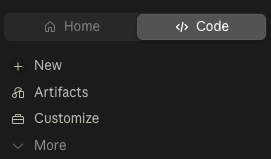
Fetch fullstackpm.com/cli and help me start Claude Code for Product ManagersClaude installs the course materials (including Module 4) and tells you how to begin. The same prompt works in the Claude Code CLI - see 0.2: Get the Course & Start for the terminal steps.
One note for this module: Claude runs the dev server, git, and the deploy for you from inside the app - you never type terminal commands yourself. Just make sure shell execution is enabled in Claude’s settings (it’s on by default in the recommended mode). Your app preview opens in the browser.
Get Started
4.1: Setup → - Learn the vibecoding mindset and set up your project